Modeling
Design and Model
Blender’s comprehensive array of modeling tools make creating, transforming, sculpting and editing your models a breeze.
Tools
Blender's modeling tools include:
- Keyboard shortcuts for a fast workflow
- N-Gon support
- Edge slide, collapse and dissolve
- Grid and Bridge fill
- Python scripting for custom tools and add-ons
Modifiers
Modifiers are automatic operations that affect an object in a non-destructive way. With modifiers, you can perform many effects automatically that would otherwise be too tedious to update manually (such as subdivision surfaces) and without affecting the base geometry of your object.
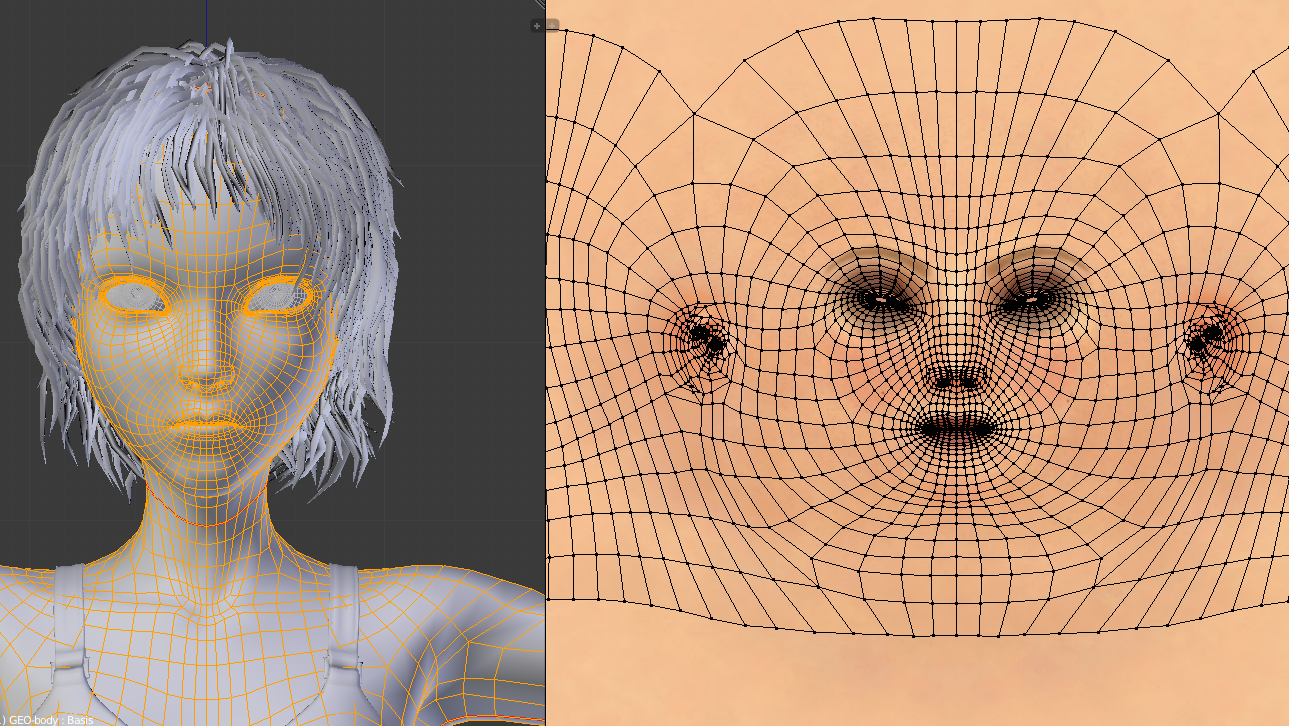
Easily unwrap your mesh right inside Blender, and use image textures or paint your own directly onto the model.
Blender allows for:
- Fast Cube, Cylinder, Sphere and Camera projections
- Conformal and Angle Based unwrapping (with edge seams and vertex pinning)
- Painting directly onto the mesh
- Multiple UV layers
- UV layout image exporting
WATCH VIDEO
READ MORE 
No comments:
Post a Comment